I’ve posted several of these real or AI image comparisons on LinkedIn, but I haven’t shared them here on my blog. A lot of AI images are really obviously AI; we’ve all seen some of the truly awful AI attempts at food photos for some restaurants. And we’re all probably tired of seeing posters with a colored brushstroke with white text on top plus excited “whisker” lines emphasizing text. While many AI images are easy to detect, I find that with high quality AI images that I can’t always tell.
See how you do at identifying AI images with these pairs. I’m starting with the oldest pairs, which are over a year old (and may be easier to identify than the newest images).
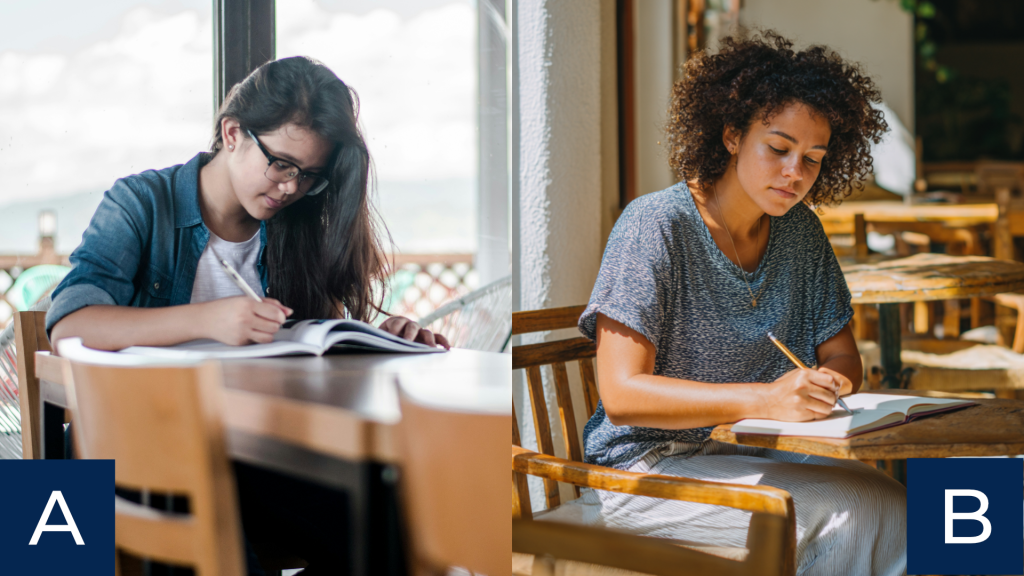
Pair 1: Sitting in a coffee shop

What do you think?
- A is real and B is AI.
- A is AI and B is real.
- They’re both AI.
- They’re both real.
Pair 2: Fall leaves

What do you think?
- A is real and B is AI.
- A is AI and B is real.
- They’re both AI.
- They’re both real.
Pair 3: Hands

What do you think?
- A is real and B is AI.
- A is AI and B is real.
- They’re both AI.
- They’re both real.
Pair 4: Conversation

What do you think?
- A is real and B is AI.
- A is AI and B is real.
- They’re both AI.
- They’re both real.
Does it matter if you use real or AI images in training?
To some extent, maybe it doesn’t matter if it’s AI or not. With my most recent pairing, multiple people shared thoughtful comments about whether they would use either of the images for training, regardless of whether they’re AI or stock photos. A realistic looking AI image that matches the context of your audience may be more effective for supporting learning than a less relevant or fake looking stock image.
Making AI images look more realistic isn’t about being deceptive; it’s about generating something that looks like our audience’s workplace and that isn’t distracting.
Ironically, as AI gets better at generating photorealistic images, I find myself leaning more into less detailed illustrations. Now that it’s easier to get illustrations in a cohesive style on basically any subject, sometimes simpler images are better. They convey the meaning without distracting learners with too much detail.
Check the answers
Don’t peek until you’re ready!
- Pair 1 (Coffee shop): A is real and B is AI.
- Pair 2 (Fall leaves): A is AI and B is real.
- Pair 3 (Hands): A is real and B is AI.
- Pair 4 (Conversation): They’re both AI. A was generated with Nano Banana; B was generated with Midjourney (and I couldn’t get hands I was happy with on the woman in red after several attempts).
How did you do? Overall, most people on LinkedIn got these questions incorrect. Sometimes they identified the AI image but thought both images were AI when one was real. The only pair the majority of people guessed right was my original pairing of hands for pair 3. I swapped out the original hand for one I generated with GPT Image 2.5 Sunburst, the newest high quality image generation model from ChatGPT. This is the first image model that accurately generated someone writing with their left hand. Every other model I’ve tested previously has failed to show left-handed writing.
And more importantly: even if you were able to identify the AI images, would images like these be good enough to use in your training? What do you think?
Upcoming events
Learning Architecture: From Content to Context. October 21. Learning Planet Institute.
DevLearn

Register for DevLearn by October 2 for the Advanced Rate. Save an extra $100 with code CHRISTY.
Branch Smarter, Not Harder: Naming Conventions, Variables, and Bottlenecks in Storyline
- November 3, 2026 at 9:20 AM
- CE01: Storyline & Rise Pro Lab
Cohesive by Design: Generate Consistent AI Icons, Illustrations & Characters
- November 4, 2026 at 10:00 AM
- BYOD (Bring Your Own Device)
Buzz Discussion: Video & Media
- November 4, 2026 at 3:45 PM
The post Real or AI? Can You Identify AI Images? appeared first on Experiencing Elearning.