
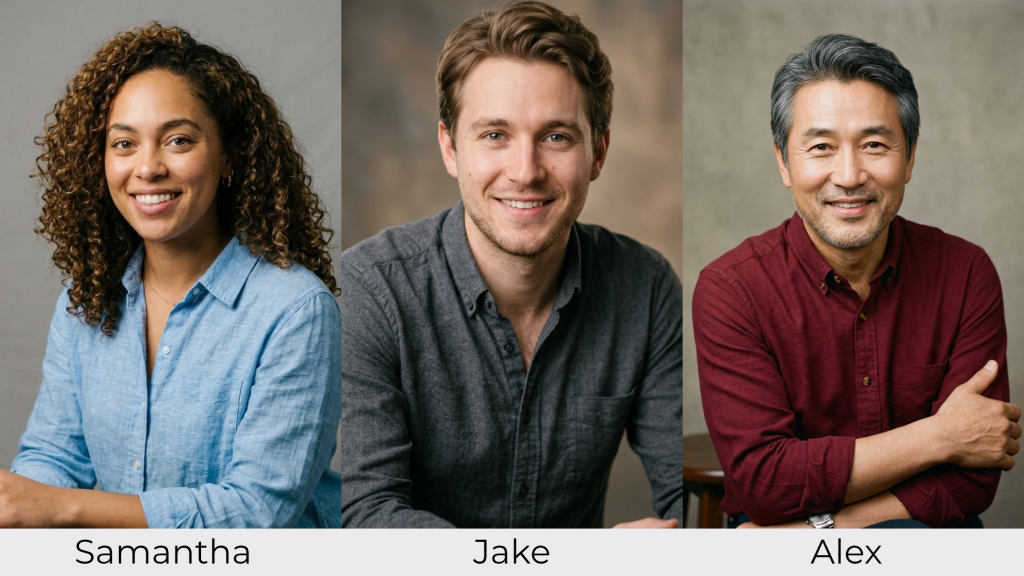
I’ve been working on updating a project management branching scenario I originally built in Twine a few years ago. I’ve already updated the interface and replaced the images. I was thinking about converting this to an interactive video scenario, using AI to generate videos rather than having static photos. I’ve been experimenting with several AI video tools (Google Omni, Minimax, and Seedance) to see what works and what’s possible, specifically with consistent characters and synced dialogue. In this post, I’ll share some of my lessons learned from these experiments generating AI videos, including what worked and what failed. I’ll also note which tools I used and the costs for each video (AI video generation costs can add up quickly!). I’ll share my process, prompts, and reflections so you can see exactly what I did and what I changed at each step.
Use reference images
My first lesson learned was to use reference images. I already knew that, to some extent, because I use reference images for character images. I used those same character reference images for all of the videos you’ll see in this post.

However, I didn’t use a reference image for the setting. While I did have images I could have used for the first frame, I’m still not completely happy with what I’d gotten previously. I decided to see how the different tools did at setting the scene without a reference image. That was OK for this experiment, but I think for further development I’d want to have at least one reference image for the setting, if not a storyboard with multiple images.
Instead of a reference image, I included a description of the room in my prompt. I include a description of art on the walls because otherwise the AI tools often fill in other details. I often get unrelated text on a whiteboard or charts on a screen, and I didn’t want those here. (Again, if I’d used a reference image for the room, that would have fixed the problem.)
The dialogue comes from the opening passage of my project management scenario.
Setting: Three people @Jake @Samantha @Alex meeting in an office conference room, all sitting around a table. Laptops and coffee mugs on the table. Light gray walls, overhead lights, abstract corporate art on the walls.

@Jake : "Alright team, we're a week behind schedule on the Healthtrack project, and the client still hasn't provided the data integration requirements we requested three weeks ago."

@Samantha: "Without those requirements, we can't properly design the system architecture. We risk making assumptions that could lead to costly rework down the line."

@Jake "We can't afford to keep falling behind. We should make our best educated guesses based on our experience and move forward."

@Alex "I'm with Samantha on this. If we don't get the integration requirements right, it could severely impact the user experience and data flow."
This first example video was generated in Google Omni 1.1 Flash. I’ve had decent luck with this model for generating b roll videos.
- Model: Google Omni 1.1 Flash
- Video length: 10 seconds
- Cost: $1.20
- Cost/sec: $0.12
All costs noted are my actual costs as calculated in Flora; I did math to determine the cost per second.
Give enough time to include the dialogue
I immediately realized one of my errors: that dialogue was too long for the generation time. The video is 10 seconds, but I had more dialogue than could fit. The AI trimmed my script to fit it in rather than using it verbatim. That would be fine for some uses, but that’s not what I wanted for this scenario.
For my next attempt, I trimmed it to just the first line of the script. I hoped that would give it enough time to keep the dialogue accurate. And…well, you can see for yourself. It was closer, but it still wasn’t quite right. I also adjusted the description of the room; I decided I didn’t like the abstract art.
Setting: Three people @Jake @Samantha @Alex meeting in an office conference room, all sitting around a table. Laptops and coffee mugs on the table. Light gray walls, gray chairs, light wood table, a clean whiteboard on the wall. Overhead florescent light.

@Jake : "Alright team, we're a week behind schedule on the Health track project, and the client still hasn't provided the data integration requirements we requested three weeks ago."
- Model: Google Omni 1.1 Flash
- Video length: 6 seconds
- Cost: $0.72
- Cost/sec: $0.12
Watch for character positions changing
One of the other problems in this video is that Alex shifts position. At the beginning, he’s sitting next to Samantha. Partway through, he magically transports to sit next to Jake. This is another problem I probably could have solved with reference images and a storyboard. I’ve even seen a demo where someone blocked the character positions in Blender for a rough 3D model and then used that to keep each character in the same place around a table. Keeping the characters and objects consistent from scene to scene is a challenge unless you’re directing it.
Some models look more AI than others
I wanted to test several models to be able to compare the results. I used the same prompt again with a different model, MiniMax. These results were even worse; this looked and sounded really obviously AI. The character and dialogue accuracy was lower. Check out how Jake’s background suddenly switches to the studio photo background rather than the conference room background. MiniMax was fast and reasonably cheap, but it’s not the right model for this task.
- Model: MiniMax H3 Max
- Video length: 8 seconds
- Cost: $0.768
- Cost/sec: $0.096
Video generation costs can add up quickly
Next, I tested Seedance. This is a higher quality model, but it’s also slower. Each generation took several minutes, where the previous videos tool under a minute to generate. I have had some good results with Seedance, but it’s also about four times more expensive than the Google or Minimax models. With Seedance, I generated an initial clip of 8 seconds. Then, I used the Extend video function in Flora to generate a second clip for the next clip with Samantha’s response. I stitched the two clips together in Flora.
- Model: Seedance 2.5
- Video length: 21 seconds
- Cost: $3.914 + $6.337 = $10.251
- Cost/sec: $0.488
You can see the Seedance clips combined below. The transition is weird; I should have prompted for the camera angle to change to point at Samantha instead of starting zoomed out and pushing in again. But because Seedance is so expensive, I was reluctant to generate another clip. If this was a real project and not for my blog, I would have had to pay the $6 for another generation.
While Seedance is higher quality (and I know I could improve my results with more detailed prompts and direction), the cost is significant. A 2-minute video would cost about $58 in generation. Knowing that some clips wouldn’t work on the first try and would need to be regenerated, a more realistic estimate for a 2-minute video might be about $75-$80. Maybe it’s because I’m used to how cheap image generation is (images cost 5-7 cents on Flora), but I was surprised at how fast the costs added up.
Voice quality and consistency concerns
AI voice overs have dramatically improved in quality in the past few years. However, in these AI generated videos, you probably noticed some issues. For example, in the Seedance clip above, Samantha has weird, overly dramatic pauses in her line. I’ve also heard issues in keeping the voice consistent for characters across multiple clips.
In order to generate enough videos for a full interactive video scenario or a longer conversation, I think I’d need to generate the audio separately in ElevenLabs or WellSaidLabs. That would give me higher quality and more control over the generation. Plus, that would fix the consistency issue; as long as you use the same voice for each character, you maintain the same sound throughout.
However, bringing in audio also means dealing with lip syncing in the video tool, and that creates a different set of challenges. How accurate is the lip syncing? How many generations does it take to get it right? After you generate clips, how much manual editing is needed?
Reflections on AI videos for training
This is a sample project for my blog and portfolio, so I’m not persisting through challenges the same way I would if this was a real client project. Right now, I feel like the AI video tools like this are good for generating short b roll clips. I’m already using AI videos for that purpose in actual explainer videos now.
For more complicated videos, it’s going to take a lot of time, iteration, and cost. There’s no magic where you drop a script in, press a button, and get a fully formed video with multiple characters, dialogue, camera angles, and consistent background out. It’s possible to generate higher quality videos with AI (check out how the 2-minute animated video Slice was created), but it takes quite a bit of work. I’ve seen some 700+ word long prompts for Seedance; that’s a lot of time directing the AI that I didn’t spend for these samples.
When my clients have asked me about AI video generation over the past two years, I’ve been telling them to wait another 6 to 12 months and then check in again. At this point, I think it can be done, but we have to be realistic about what it takes. All of these models are cheaper than hiring actors for a half day shoot, but it’s expensive and difficult enough that I’d need to scope it realistically.
Will you know that all of these are AI-generated videos? Yes. But getting the quality good enough to be useful for training scenarios doesn’t necessarily mean it has to be indistinguishable from using human actors. In fact, I think sometimes we’re better off using illustrated or animated styles that don’t pretend to be real people. You can still get the value of a conversational example or interactive video with something illustrated.
AI video tool comparison
Here’s my summary of the three AI video tools I tested.
| Tool | Cost per second | Notes |
|---|---|---|
| Google Omni 1.1 Flash | $0.12 | Great for b roll videos; less accurate with dialogue. Maintained visual consistency from reference images. |
| MiniMax H3 Max | $0.096 | Character consistency from reference images was lower; looks very obviously AI |
| Seedance 2.5 | $0.488 | Higher quality and better character consistency, but more expensive and slow. Benefits from very detailed prompts. |
New Hands-On AI Image Workshop
Want to learn how to generate higher quality AI images—visuals that are good enough to actually use in a course? Part of the trick with AI image generation is that even if you start with a good prompt, you still may need to iterate a few times to refine it. Even though I’ve presented on AI images multiple times, it’s impossible for me to give participants enough time to really practice that iteration process in a one-hour webinar.
That’s why I built a new three-hour hands-on AI image workshop. You get six rounds of live practice. After each round, we review your results so we can figure out how to improve them. I’ll give you a reusable prompt framework as a starting point, and then we’ll work on iterating and improving images, using reference images for consistency, and matching brand colors. This is geared for L&D professionals, so I focus on the kinds of images commonly used in training like photorealistic examples and icons. You’ll leave with a small set of images for a real project of your choice, ready to use in a course.
The post Lessons Learned while Generating AI Videos appeared first on Experiencing Elearning.