
I needed a sample branching scenario to use for the practice activities in my session for the Articulate Pro Lab at DevLearn. My session is on naming conventions, variables, and bottlenecks, so I needed all of those elements in one practice file. I decided to have a little fun with a scenario about working the help desk for a time travel agency rather than my usual realistic work settings. This branching scenario also gave me an opportunity to test working with Claude and Flora, including using Flora’s MCP to connect the two so Claude could generate the images for me.
Try the ChronoVoyage Tours scenario
Email readers, if the scenario isn’t embedded below, try opening it in a new tab.
My process with Claude and Flora
I used Claude Opus 5.5 to develop this scenario, including drafting the text and the structure. All of the images were generated in Flora, but most of the image prompts were also written by Claude rather than by me. Then, I built everything in Storyline, adjusting some of the text and adding a few additional images.
Here’s the process step-by-step in more detail, including which tool I used and what portions were my work versus the AI.
| Task | Tool | Notes |
|---|---|---|
| Scenario concepts | Claude | I prompted Claude for 5 ideas for a branching scenario with several specific structural requirements based on what I knew I needed to teach. I gave it a few examples of fun topics I’ve seen in other conference sessions. |
| Pick a concept | Human | I selected my favorite concept. |
| Draft scenario map and variable plan | Claude | Claude created a build guide for me with the outline, branching map, slide list, naming conventions, a variable and trigger plan for two sets of practice activities, and participant instructions. |
| Review the scenario | Human | I reviewed the scenario. Overall, I was happy with it. The answers are easy to guess, which is a common problem with AI-generated scenarios. I decided it was close enough that I could edit some text and make the choices a little less obvious. |
| Connect Claude and Flora | Human | I installed the Flora MCP in Claude, which lets Claude connect to Flora and use it to generate images. |
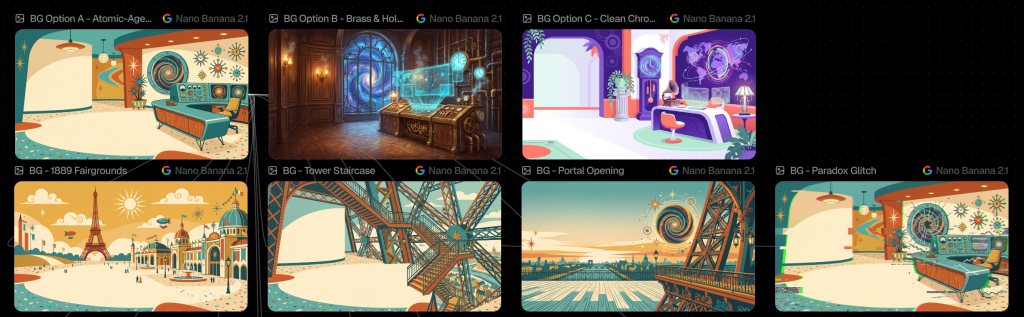
| Look and feel options | Claude + Flora | Claude used Flora to generate three different look and feel options I could use as a background and as a starting point for the style. I gave it some general ideas, but Claude wrote the prompts. |
| Select look and feel | Human | I selected my favorite of the three styles (see the image below for my options). |
| Generate images | Claude + Flora | Claude generated the additional backgrounds and characters in the same style on the same Flora canvas. I gave Claude a $3 price limit for the images (the actual total ended up around $2). |
| Provide feedback | Human | The original version of the Gus character wasn’t quite in the same style as Rosa. I provided feedback about what I wanted to change. |
| Generate character poses | Claude + Flora | After generating a revised version of Gus’s character sheet and getting my approval, Claude used the Flora canvas to generate additional poses. There was a glitch with the Nano Banana model being unavailable, so it tried again. After multiple failures, Claude asked me whether I wanted to switch models or wait. I waited a while and tried again manually myself in Flora, but eventually I switched to a different image model. |
| Storyline build | Human | I followed Claude’s build sheet to build the 24 slides in Storyline with all of the triggers and the Timeline Stability meter. I also did the QA testing myself. |
| Generate additional images | Flora | I used Flora to manually generate a few additional images I decided I wanted while I built the scenario. |
Images in Flora
On the Flora canvas, you can see the original three look and feel concepts plus the additional backgrounds in the style I selected.

I used the built-in tool for background removal within Flora to put the characters and objects on a transparent background.

Storyline build
The branching structure in this scenario is deliberately not terribly complicated since it’s designed for others to use for practice. The scenario branches out a little with parallel tracks for Decision 2 but then consolidates to a bottleneck for Decision 3.

Articulate has an MCP that can be connected to Claude, but it doesn’t do this kind of Storyline development work (at least not yet). It would be interesting to see if Claude could follow its own build sheet to develop something in Storyline.
Reflections
Using Claude and Flora definitely sped up the time required for planning, drafting, and image generation. I might do a little more manual prompting for the initial reference images for a real client project, but using Claude to generate the prompts for Flora worked well. This is one of the first times I’ve truly used Claude as an agent to take actions in another program, and I’m happy with the results.
The wrong answer in the scenario are too obviously wrong, even after I tweaked the wording to make the distractors more tempting and plausible. That’s one of the ongoing stumbling blocks I see with AI-written branching scenarios and some dynamically generated scenarios. They’re consistently too easy.
In total, this took about 9 hours for me to build. Without AI, it definitely would have taken me longer to assemble the images from stock illustrations and cutout character images. I would have spent more time on the writing too, but if this was a real client project I’d also need to spend more time writing and revising the text.
But overall, this worked well for my purposes for a Storyline development practice scenario. The AI tools have come a long way since I used ChatGPT to write a prototype scenario back in September 2023.
More on scenarios and AI
Read more about branching scenarios and how I’m using AI in my work.
- Managing the Complexity of Branching Scenarios
- Branch and Bottleneck Scenario Structure
- Branching Scenarios in Storyline: Layers or Slides?
- Speed Up Character Image Creation with Flora
- Updating Scenario Character Images with Flora
- Updating A Twine Branching Scenario with AI – Part 1
The post ChronoVoyage Tours Branching Scenario Example appeared first on Experiencing Elearning.