One of the recurring themes of the DevLearn conference this year was AI, as expected. This year I heard a lot more about the specifics of how and when to use AI, plus bigger questions about ethics, governance, and leadership. I take notes by hand during sessions. I’ve found over the years that if I don’t review those notes shortly after the conference that I forget too much of what I learned. Perhaps ironically for as many AI-related sessions as I attended, I’m not using any AI assistance for this summary. While it’s easy to put the scans of my notes into an LLM and have it pull out the highlights, the effort of doing it myself is beneficial. I need to do that cognitive work myself; I can’t outsource that to AI without losing some of the value.
For this recap, I’ll share one or two key points or useful takeaways from each session
Tuesday: Storyline & Rise Pro Lab
AI Assistant
The day started with David Anderson giving an overview of the AI Assistant features in Rise and Storyline. I admit that I haven’t tested out these features too much yet. One feature I noted that I want to test is using the AI to sync objects to audio with AI. That can be a really tedious process, and I’m interested to see how much time that can save me.
Speed Up Development
I also attended Diane Elkins’ session on Tips and Tricks to Speed Up Development. While a lot of these tips were things I already do, I loved her tip about rethinking of Feedback Masters as Layer Masters. While Slide Masters obviously save a lot of design rework, they only work on the base layer. But Feedback Masters are effectively a reusable layout for any layer. We normally only use them for feedback layers, but they could be used for any sort of layer: character dialog, additional content, etc.
Code Block Showdown
The Code Block Showdown was a lot of fun. Jeff Batt gave 4 people (Destery Hildenbrand, Melissa Milloway, Casey Shiray, and Diane Elkins) the same starting request and 5 minutes to vibe code an interactive block for Rise. Then, they each explained their blocks, and everyone in the audience voted on their favorites. It was a great example of what could be done quickly as well as interesting to compare how different their results sometimes were.
My session: Branch Smarter, Not Harder: Naming Conventions, Variables & Bottlenecks
You can see the demo branching scenario I used for my session and how I built it in my previous post about ChronoVoyage Tours. I was overly optimistic about how much interactive practice we’d be able to accomplish in a 40-minute session, so I had more planned than we had time for. Although my timing was off, I’m glad I helped multiple people create their very first variables and triggers in Storyline, and they have the demo files to practice with later.
Wednesday: DevLearn Day 1
The Courage to Think Differently
After the preconference, Day 1 started out with Dan Pontefract’s keynote. One idea I got from the keynote was his idea of a “career canvas” rather than the traditional metaphor of a “career ladder.” Careers aren’t a linear upward climb to successively more valuable roles. Fulfilling careers can be multidirectional.
My Session: Cohesive By Design: Generate Consistent AI Icons, Illustrations, & Characters
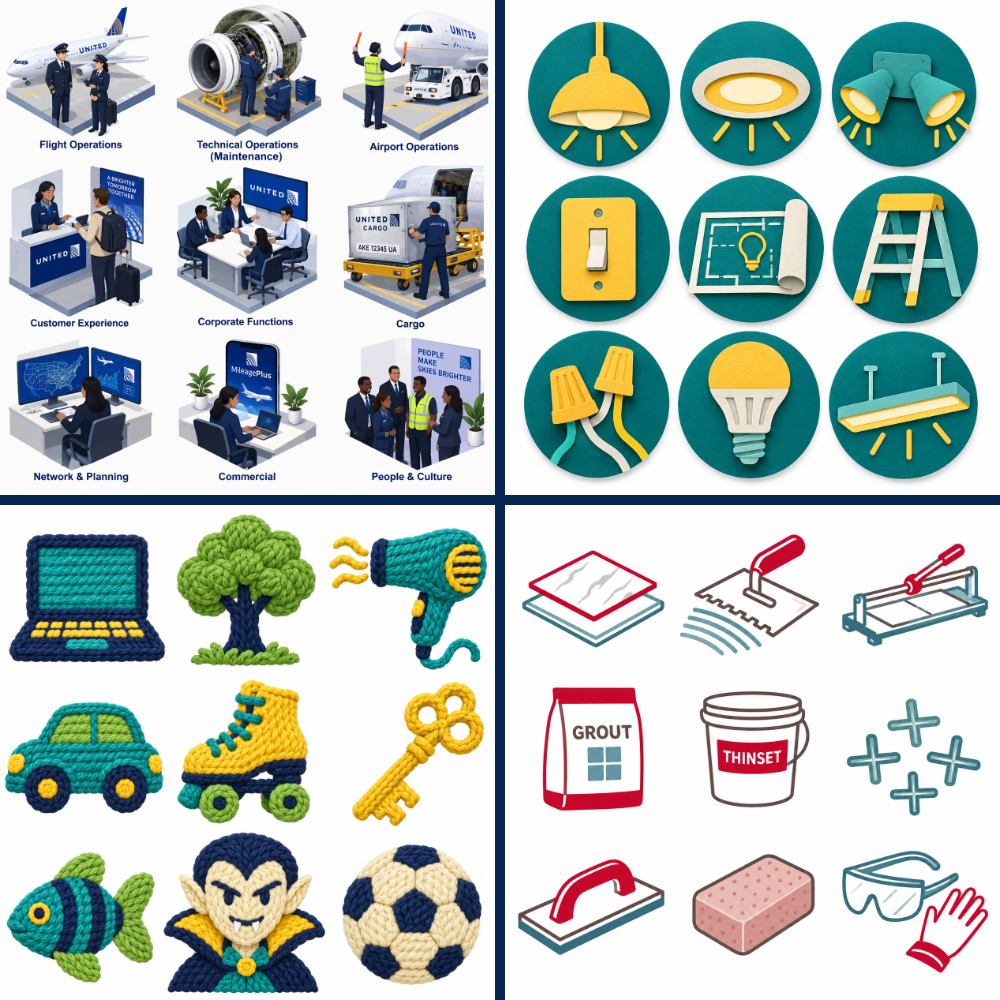
I always love leading BYOD (Bring Your Own Device) sessions because people get to apply what they’re learning right away. Check out just a few of the custom icon sets below that participants generated live during my session with just a few minutes of practice! We talked about different styles of icons including isometric, paper cutout, and line icons, plus prompting to keep a consistent color scheme. Participants were able to generate a wide range of styles for icons and illustrations plus a few images of a single character in different poses and scenes.

Gamification that Works
This session demoed some call center scenario training. One of the things I appreciated seeing was their dashboard that showed the stats for the scenario, including a breakdown of responses per question. They also included an AI analysis of the data that summarizes the data, highlights strengths and weaknesses, and recommends next steps. Stakeholders in the business probably don’t really care about the answers to each question (that data is more for the L&D team), but having that summary easily accessible makes it easier to translate that data for them.
Developing AI-Ready Learners
While I don’t work much with higher ed clients, Adam Hogan’s session on human judgment and ethics was worthwhile. He said, “Tools don’t determine outcomes. Human capabilities do.” He noted that our feelings and confidence in AI are often wrong. We need more confidence in ourselves.
You have to calibrate your work with AI. What do you do with the results AI gives you? If you trust it too much, you get errors. If you trust it too little, you don’t get the benefits. The jagged frontier of AI makes it hard to know what AI is good at or not.
Learning happens in the effort: explaining, organizing, connecting, evaluating. Yes, AI can do that work, but if you offload it all to AI, you don’t learn as well.
Should you offload work to AI or stay engaged with it? If any of these are false, stay engaged.
- Low stakes
- Easy to check
- Not the skill you’re trying to build
The Language of Learning: Mastering Writing for Instructional Design


I also got to promote the new book The Language of Learning. Hadiya Nurridin is the one who really deserves all the credit as the editor who kept all of us contributors on track and shepherded us through the whole process. But I’m proud to have contributed a chapter on scripting, and it was exciting to see the physical book for the first time at the conference book store. You can preorder the book now.
Buzz: Video & Media
The Buzz sessions were in a different format this year, with multiple speakers from a single track available at the end of the day to answer additional questions. Samuel Apata and I facilitated a conversation about AI, images, and media. I wish the Buzz sessions had been a little longer; we had plenty of discussion left when we hit the 30-minute mark.
Thursday: DevLearn Day 2

Learning Design in the Age of AI
Luke Hobson started out day 2 of DevLearn with some good laughs. I appreciated his energy and his questions for the panel who joined him for the keynote: Karl Kapp, Tessa Forshaw, and Brandy Ford.
Karl Kapp noted that we as instructional designers add friction, and that’s our value. We ask questions and identify the steps SMEs skip when they explain processes. IDs have lots of valuable skills that help us be more effective working with AI, including our ability to behaviorally define skills, outcomes, examples & non-examples.
Brandy Ford noted that AI is a lever and an enabler, not a replacement. Balance the pressure to adopt AI with solving a real business problem.
Tessa Forshaw discussed the importance of “effortful practice” in the neurobiological event of learning. If we stop doing something, we gradually lose our skills.
Clone Your Best Evaluator: Build AI Rubrics That Actually Capture Quality
While I enjoy hearing from certain speakers over and over at conferences, I also try to seek out some voices I haven’t heard before. Dakota Duffy was one of those new-to-me speakers, and I’m really glad I attended her session on rubrics. This was a 90-minute session, which meant we had some more time to practice. While she was talking about this in terms of giving AI rubrics to evaluate human performance at scale, I think this all could apply to creating rubrics to evaluate AI outputs as well (including having an AI evaluate itself or another AI).
Interview your SMEs for observable evidence you can include in a rubric, not just “the right way.” (These questions work for gathering info for scenarios too!)
- Compare: Which is stronger and why?
- Probe: Which warning sign changes your decision?
- Challenge: Which different approaches are acceptable?
- Boundary: What looks plausible but creates real risk?
The AI doesn’t know what you meant. If you don’t specify, the model infers what counts. Break down larger decisions into separate, more granular decisions.
Four types of scoring ambiguity:
- Interpretation: What does “appropriate” mean?
- Sufficiency: How much evidence is enough?
- Boundaries: When does level 1 become level 2?
- Construction: Does this show judgment or just fluent writing?
Ditch the Quiz: AI Scenarios
This session had a serendipitous connection to the rubric session I attended before it because they used a rubric for behavior mapping to evaluate responses in their AI roleplays. The speakers used Yoodli as their platform, but there are several other AI roleplay tools available.
The presenters shared how they combined their scenario blueprint (the roleplay structure with context, goal, and personas) with the behavior rubric (behaviors, observable evidence, and feedback).
Instructional Design Buzz
One of the topics of discussion was about simulations and the cautions for working with simulations. They need to feel real. If a simulation feels fake at all, or participants think “nobody talks like that,” it immediately undermines the whole activity. The choices need to be not obvious for a simulation to be valuable.
Another point raised: don’t collect data you don’t need. When you’re deciding what data to collect, ask: What will that data let you do?
Friday: DevLearn Day 3
From Passive to Playable: Interactive Video
I could only attend one session on Friday morning before heading to the airport, and I was looking forward to Buddy Butler’s session on interactive video. One of the key themes of this session was that interactivity in video doesn’t necessarily have to mean branching scenarios or role plays. We can give learners agency at meaningful moments in other ways too, and you can combine different types of interactivity into a single learner experience.
What does the learner need to control?
- Decision point: What should I do?
- Attention: What should I notice?
- Support: What help do I need?
- Flow: Where should I go next?
Conversations and connections
And of course, one of the big reasons you go to a conference like this is to see people in person that you’ve maybe only met online, to have conversations and make new connections. I enjoyed a “dine around” dinner with Dan Keckan and the Cinecraft team plus Cyndi Nagel and Jennifer Fitzpatrick, several receptions and happy hours, and a dinner with Karl Kapp, Jessica Briskin, and the students and alumni of Commonwealth University. That’s in addition to the conversations in the Expo hall and between sessions. As much as I love online, being physically together in the same space has a different energy.


The post DevLearn 2026 Recap appeared first on Experiencing Elearning.